
When I’m traveling I simply use my laptop and am convinced not much else is needed for a trader. Multi-monitor setups are nice but don’t go overboard… 90% of traders lose money and trust me, it’s not because they don’t have enough monitors.
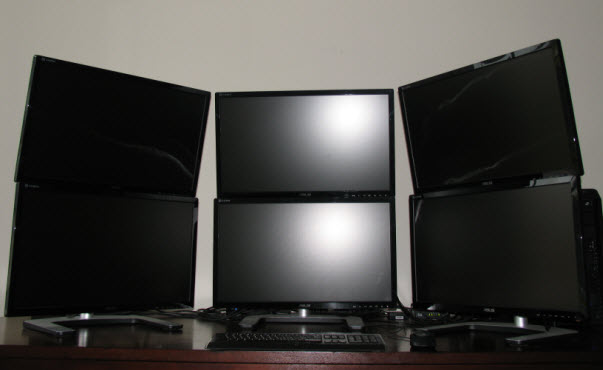
When I first left teaching in public schools about a year ago I started with 1 desktop monitor and a laptop. Then I upgraded to 3 desktop monitors which you can read about here and now I run 6 because this is my business and it simply makes my job easier. In addition, I write all of this off so why not. I run E*Trade Pro on 3 screens, both premium chat rooms on 1 screen, EquityFeed on a screen and FireFox on the last screen.
Here are the latest components I use to run this setup in case you’d like to build something similar. I ordered almost everything other than the mounts, cables and tower from Newegg.com. I found Amazon.com had the best prices for the mounts and cables and I bought my tower from BestBuy.
I assembled this on my own with the help of a friend. It’s really not that hard but if you’re new to computers your local computer store will assemble it for a small fee. You’ll need Windows and what not once it’s put together. I’m looking to upgrade the size of my tower soon, it’s packed tight to be quite honest, however all of this should fit in any midsize tower like my current enclosure.
The sweet part about this setup is 1 graphics card runs all 6 monitors which makes use and setup very convenient. The 6 mini displayport cables go from the back of the graphics card to displayport on the monitors. A lot of monitors don’t have displayport connections which is why I went with the ASUS line.
The tower rests on my desk behind the right monitor and you’ll need at least an 8′ desk to support this large setup. The monitor mounts are simply the best mounts I’ve ever worked with, very smooth and take no time to setup. Email me jason@jasonbondpicks.com if you have any other specific questions but this should point you in the right direction.
Monitors – 6 ASUS 27″ Displays
Video card – 1 VisionTeck 900373 Radeon HD 6870 2GB
Cables – 6 Monster Mini DisplayPort to DisplayPort
Mounts – 3 Visidec VFS-DV
Motherboard – 1 ASUS Crosshair IV
Processor – 1 AMD Phenom II 3.2 GHz 6-Core
RAM – 4 4G G.SKIL Ripjaws
Hard drive – 1 OCZ Vertex 2 SSD
Power supply – 1 Antec EarthWatts 750W
Tower – 1 Antec Nine Hundred Two V3
Jason,
That’s an awesome set-up. I’m surprised you only needed the 1 graphics card. Would have figured with that many displays two would be necessary for 1080p displays. Either way. Still awesome.
Oh and you should run Google Chrome instead of Firefox 🙂
Thanks Scott, that was the trick, took me a while to figure out how I’d run 6 off 1 card but I absolutely love it. The mini displayport to display port is what allows it to work since it’s not all on the same clock from what I understand. They’re all running 1080p with a screen resolution of 1920 x 1080. I do like Google Chrome and use it from time to time.
Your the man JB thank you soo much for this blog. Much needed
Jason,
This is really helpful and timely.
Thanks.
Awesome set up JB…im still working with my mini laptop because I’m on the run most of the time but would love to have something similar…with your help in building my account will hopefully get it in the near future. Never change your style JB keep up the excellent job!!!
Great setup. Similar to mine without multiscreens. I used the Corsair 600T case. I can fit anything in there.
When I grow up, I’m gonna get one of those. Looks great, Jason.
I love it Tom, classic right… when have you not known me to overdue it?! Anyway, I sure hope we’re at this for a long, long time my friend. If I ever hit a $50,000 trade I’ll be meeting up with you in Vegas, that’s for sure.
Thomas, do you live in LV? I do. Just wondering.
I’m just starting the service, first day was great. Doing options, stocks and some small Forex positions I’m going to have to expand from desktop and laptop with iPhone filling some holes. Good luck. Dennis
What did the set-up cost you, if you care to share? Also, how do you run all the monitors from one keyboard? I see only one in the picture. TIA.
Hi Jeff. The monitors were about $350 a piece so that added up fast, the stands $150 a piece and the cables $50. The computer was about $2,000 for everything and that’s basically all the major expenses. The graphics card is what allows me to run all 6 monitors and therefore control them with one keyboard, that’s the key, the graphics card. Cheers, J.
yeah, will think about that in a near future…
that video card is deactivated already. my how technology changes so faaaaaaaaaasssst.
Crazy right… I saw that too.
Those Usb to Video (Dvi/Vga) are cheap, easy and are a solid replacement option for that card. A Usb expansion card for 10-20 bucks frees up ports.
Looks good. I’m going through http://www.ibuypower.com for a fully customizable tower and getting my monitors from a third party. Thanks JB and VRNG!
There is a new version of that card with a faster chip set around XMAS so lets make the money now so we can have all these wonderful toys to play with. Amituofo!
Eplicentratificly EPIC
that is a very nice Mr.Jason , i want to ask u something please if u never mind …how to learn six multi monitors for trading and why? & how speed one the net for forex , stock , options , etc? thanks
Morning. I don’t think 6 is necessary unless you are day trading and even in that case I think 4 27″ monitors is plenty. Keep in mind I’m running a business while trading so having a few additional screens for work when I was day trading helped a lot. As a swing trader I think 2 is more than enough, it’s only when I started day trading that I added monitors.
ok i understand u Mr.Jason thank you very much God bless u Mr.Jason
is there an iphone app to access the chat room?
Yes go to the ‘how to’ section on the website.
Jason I travel for a living ie a pilot so what would you reccomend to keep it simple but allow me to see and do what I need from a hotel room. Using an ipad right now and can not see your videos clearly at all.
Thanks
Any Macbook would work great.
Any MacBook Pro will work great. AND when you are home you can run two thunderbolt monitors off it with no trouble , so that gives you 3 total.
Also go to apple.com for refurbished models and save a few hundred bucks …. you still get the brand new warranty with them as well…..
http://store.apple.com/us/browse/home/specialdeals/mac/displays
Great stuff! How do I get ETrade Pro to go across all my monitors though? Right now it’s stuck on only 1 🙁
Figured it out, of course after i make the post =).
I’m on OSX 10.9 and there’s a new “feature” that prevents the app from spanning across all windows. For anyone else interested, you need to go to System Preferences > Mission Control and UNcheck “Displays have separate Spaces” and then logout and log back in.
Cheers and thanks for the heads up on PHOT! Learning a TON from you JB!
.: Adam
Thank you so much! Your answer was very helpful!
Thank you struggled with this for almost a week.
Thank you so much! I’d been trying to figure this out for a month before I found you post… THANK YOU for sharing!
You can float the widgets on any screen with E*TRADE Pro.
Jason, what subject did you teach/grade in school? I also am a teacher, getting into trading, and I know I can do mostly forex in the morning before school as I start up here.
Elementary PE, you?
Do you plan to use or suggest 4K (Ultra HD) monitors?
I have a 4k TV but don’t think I’ll be looking at a 4k monitor anytime soon. Since I stopped day trading recently I’m using an 27″ iMac and Thunderbolt for monitor 2, that’s been plenty for swing trading. In fact, right now I’m working on my Macbook Pro and spend many days using that. What do you like about 4k monitors? I looked into it but didn’t see a reason to make the move.
I trade using supply and demand, and I need to view on the left for these zones on multiple time scales. I found it easier and error free to view the previous zones (90 days, w/d/60minutes) on 40 inches 4K TV (used as monitor)
I dream of having two such monitors connected to my DELL LATITUDE laptop, one for the master and another for detail, waiting for the technology to freeze.
I request you to connect your 4K to the system and give a try and comments on the layout.
I like that idea, I was researching a few 4k TVs for a very similar reason. I could connect the laptop to the TV and check it out but there’s plenty of YouTube videos covering this already – my perception when I was looking into it is that it works quite nicely as the resolution is comparable to a monitor.
Since I upgraded to OSX 10.9, I’ve had an issue with Etrade Pro on multiple monitors. I’m using two 24″ ASUS external monitors with a MacBook Pro. When dragging around charts, watch list, scans, etc. they’re all over the place on the screen. it’s very difficult to get them sized and placed correctly. Eventually I get what I want, but it’s a pain getting there. Everything was fine in Snow Leopard.
how are you running Etrade Pro on 3 screens, Etrade Pro logs you out if you run another instance of the software
I carry the windows to new screens, you can build it out as big as you like that way but it’s not a new instance of E*TRADE Pro.
Where is the setting to float the windows to new screens? I am also trading on a Mac.
I would like to move different tools to separate monitors.
Great question, with a Mac and my two monitors I have not figured out how to float to different monitors. It works with a PC though. If you figure it out, let me know. I’m using an iMac and a Thunderbolt for monitor 2. Since I stopped day trading I don’t really need to float widgets to different monitors.
After some research and phone calls today I found the fix. First with E*Trade pro closed go to the settings on your Mac computer. Then go to Mission Control < Uncheck "Displays have separate Spaces". Then back in settings make sure in the displays section under the arrangement tab you have mirroring off and the displays adjusted accordingly. Close the settings and restart your computer. Log in to E*Trade pro and you will now be able to take any tool to a separate display by clicking the title bar and dragging it out of the sandbox to the desired location.
Jason, I was wondering what do you use for Internet? I’m afraid to attempt some of those fast day daytrades with Luke, because the Internet sometimes has a delay.
I have Time Warner for Internet, they’re great for my area of the country.
Jason how did I change my name so it does not appear? It’s important that I change it!!!
Hi, we go by real names at JBP, email jason@jasonbondpicks.com if that’s a huge issue and we’ll help you out.
Hello Jason, but looks like you could get a lot of work done the way you have it – thanks 4 all the great pix.